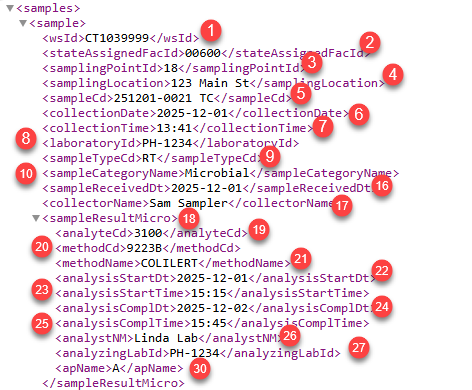
The CMDP Sample Results Report can output the XML file for upload to the portal. Example CMDP-Samples-ExampleOutput.xml
1. Set the Report Type to CMDP-SR
2. Use the CMDP Sample Results template - See CMDP Drinking Water Templates - CMDP-SampleResults.hwr
Microbial (Sheet 1)
|
Field |
Cell |
Example |
| 1 |
<wsid> |
C9 |
CT1039999 |
| 2 |
<stateAssignedFacId> |
D9 |
00600 |
| 3 |
<samplingPointId> |
E9 |
18 |
| 4 |
<samplingLocation> |
F9 |
123 Main |
| 5 |
<sampleCd> |
A9 |
251201-0021 TC |
| 6 |
<collectionDate> |
|
2025-12-01 |
| 7 |
<collectionTime> |
|
13:41 |
| 8 |
<laboratoryId> |
|
PH-1234 |
| 9 |
<sampleTypeCd> |
|
RT |
| 10 |
<sampleCategoryName> |
|
Microbial - hard coded for sheet 1. |
| 11 |
<comments> |
|
|
|
|
|
|
| 12 |
<repeatLocationName> |
K9 |
If I9 =trigger, Repeat, or confimation |
| 13 |
<originalLabSampleCd> |
L9 |
|
| 14 |
<originalLaboratoryId> |
M9 |
|
| 15 |
<originalCollectionDate> |
N9 |
|
|
|
|
|
| 16 |
<sampleReceivedDt> |
B9 |
2025-12-01 |
| 17 |
<collectorName> |
P9 |
Sam Sampler |
| 18 |
<sampleResultMicro> |
|
|
| 19 |
<analyteCd> |
Q9 |
3100 - Left part of cell split on "-" |
| 20 |
<methodCd> |
AC9 |
9223B - Left part of cell split on "-" |
| 21 |
<methodName> |
AC9 |
COLILERT - Right part of cell split on "-" |
| 22 |
<analysisStartDt> |
AD9 |
12/1/2025 |
| 23 |
<analysisStartTime> |
AE9 |
15:15 |
| 24 |
<analysisComplDt> |
AF9 |
12/2/2025 |
| 25 |
<analysisComplTime> |
AG9 |
15:45 |
| 26 |
<analystNM> |
AH9 |
Linda Lab |
| 27 |
<analyzingLabId> |
AI9 |
PH-1234 |
| 28 |
<comments> |
AK9 |
|
| 29 |
<volumeAssayed> |
AA9 |
|
| 30 |
<apName> |
S9 |
A - If cell = "P" or "PRESENT" sets to P, otherwise A |
| 31 |
<count> |
U9 |
|
| 32 |
<typeCd> |
V9 |
|
| 33 |
<resultVolume> |
W9 |
|
| 34 |
<interferenceCd> |
Y9 |
|
| 35 |
<sourceTypeName> |
AJ9 |
Typically blank, options are Flowing Stream, Lake, Reservoir, GWUDI |
|
</sampleResultMicro> |
|
|
|
<sampleResultField> |
|
|
| 36 |
<analyteCd> |
AL9 |
1013 - Left 4 chars |
| 37 |
<methodCd> |
AQ9 |
4500 - Left part of cell split on "-" |
| 38 |
<methodName> |
AQ9 |
CL G-DPD COLORIMETRIC - Right part of cell split on "-" |
| 39 |
<analystNM> |
AR9 |
Bob Operator |
| 40 |
<comments> |
AS9 |
|
| 41 |
<result> |
AN9 |
|
| 42 |
<uomName> |
AO9 |
|
|
</sampleResultField> |
|
|
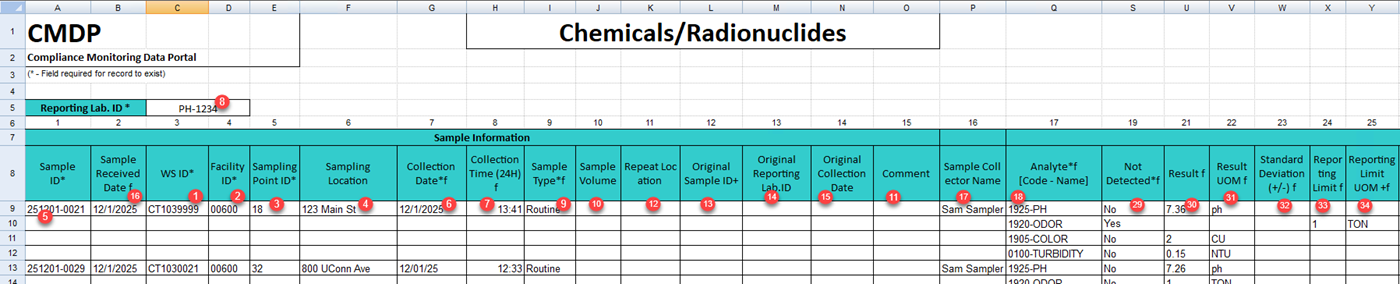
Chem Rads (Sheet 2)
|
Field |
Column (Col Number) |
Example |
| 1 |
<wsId> |
C (3) |
CT1039999 |
| 2 |
<stateAssignedFacId> |
D (4) |
00600 |
| 3 |
<samplingPointId> |
E (5) |
18 |
| 4 |
<samplingLocation> |
F (6) |
123 Main St |
| 5 |
<sampleCd> |
A (1) |
251201-0021 |
| 6 |
<collectionDate> |
G (7) |
12/1/2025 |
| 7 |
<collectionTime> |
H (8) |
13:41 |
| 8 |
<laboratoryId> |
C5 |
PH-1234 |
| 9 |
<sampleTypeCd> |
I (9) |
Routine |
| 10 |
<sampleVolume> |
J (10) |
|
| 11 |
<comments> |
O (15) |
|
| 12 |
<repeatLocationName> |
K (11) |
If Column 9 |
| 13 |
<originalLabSampleCd> |
L (12) |
|
| 14 |
<originalLaboratoryId> |
M (13) |
|
| 15 |
<originalCollectionDate> |
N (14) |
|
|
<sampleCategoryName>Chem/Radionuclides</sampleCategoryName> |
|
|
| 16 |
<sampleReceivedDt> |
B (2) |
12/1/2025 |
| 17 |
<collectorName> |
P (16) |
Sam Sampler |
|
<sampleResultChem> |
|
This section is repeated for each test in sample |
| 18 |
<analyteCd> |
Q (17) |
1925, chars left of "-" |
| 19 |
<methodCd> |
AB (28) |
2150B, chars left of "-" |
| 20 |
<methodName> |
AB (28) |
Threshold Odor Test, right of "-" |
| 21 |
<analysisStartDt> |
AC (29) |
12/1/2025 |
| 22 |
<analysisStartTime> |
AD (30) |
14:45 |
| 23 |
<analysisComplDt> |
AE (31) |
12/1/2025 |
| 24 |
<analysisComplTime> |
AF (32) |
14:45 |
| 25 |
<analystNM> |
AG (33) |
Linda Lab |
| 26 |
<analyzingLabId> |
AH(34) |
PH-1234 |
| 27 |
<comments> |
AI (35) |
Optional, not in XML output if blank |
| 28 |
<volumeAssayed> |
Z (26) |
Optional, not in XML output if blank |
| 29 |
<notDetected> |
S (19) |
No, set to true or false in XML output |
| 30 |
<result> |
U (21) |
7.36 |
| 31 |
<resultUomName> |
V (22) |
ph |
| 32 |
<standardDeviation> |
W (23) |
|
| 33 |
<reportingLevel> |
X (24) |
1 |
| 34 |
<reportingLevelUomName> |
Y (25) |
TON |
|
</sampleResultChem> |
|
|
| 35 |
<sampleResultField> |
|
|
|
<analyteCd> |
AJ (36) |
|
|
<methodCd> |
AO (41) |
|
|
<methodName> |
AO (41) |
|
|
<analystNM> |
AP (42) |
|
|
<comments> |
AQ (43) |
|
|
<result> |
AL (38) |
|
|
<uomName> |
AM (39) |
|
|
</sampleResultField> |
|
|
|
|
|
|
|
|
|
|
|
|
|
|